VMware : Using Ansible to update VMware vSphere
In any environment, small or large, it’s always considered best practices to keep a platform up to date especially with all the CVE we have seen recently.
With Update Manager or Lifecycle Manager, ESXi patches shouldn’t be that painful. But planning to patch your environment composed of many hosts, on different vSphere Clusters and vCenters may be a challenge for a sysadmin.
Ansible has by default a lot of VMware modules that can help to automate VMware vSphere tasks and resources. With these modules, you can perform many kind of configuration management which allows you to save time on day 2 operational tasks such as updating your ESXi hosts.
In this post, we will learn how we can use Ansible to patch and upgrade your ESXi hosts. First, we recommend you to set up an Ansible project directory and create an inventory file that looks like the one below:
[ESXi]
Host1.domain.com ansible_ssh_pass=xxxxxxxx ansible_ssh_user=root
Host2.domain.com ansible_ssh_pass=xxxxxxxx ansible_ssh_user=root
…..
Hostn.domain.com ansible_ssh_pass=xxxxxxxx ansible_ssh_user=root
The playbook will perform 5 tasks on each host described on the inventory file above.
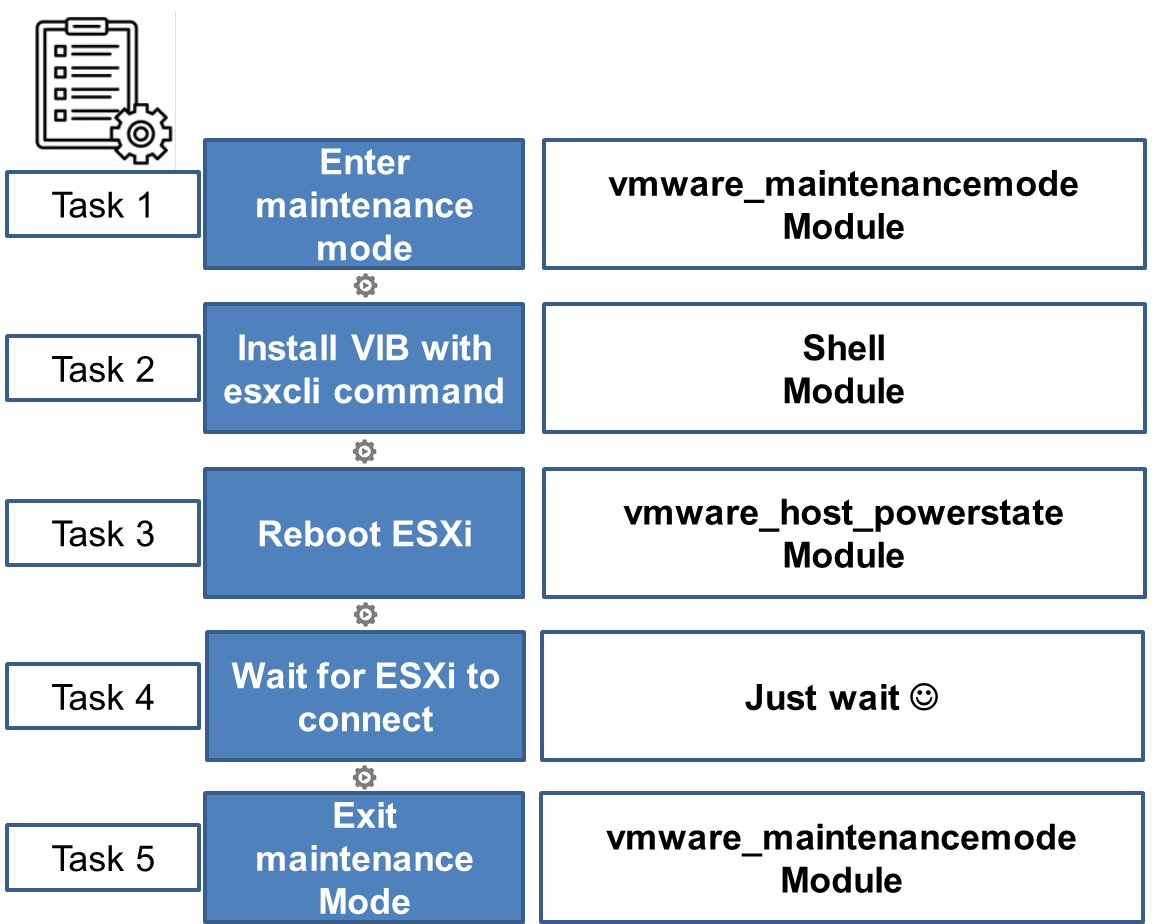
The code can be found on GitHub.
---- hosts: ESXiserial: 1vars:vcenter_hostname : "Your vcenter hostname"vcenter_username: "Your vcenter username"vcenter_password: "Your vcenter password"tasks:- name: ESXi enter maintenanceregister: statusvmware_maintenancemode:hostname: "{{ vcenter_hostname }}"username: "{{ vcenter_username }}"password: "{{ vcenter_password }}"esxi_hostname: "{{ inventory_hostname }}"evacuate: yesvalidate_certs: notimeout: 3600state: presentdelegate_to: localhost- debug: var=status.msg- name: ESXi Install Updateshell:"esxcli software profile update -d /vmfs/volumes/XXXXXXXXXXX/ESXi670-202102001.zip -p ESXi-6.7.0-20210204001-standard"register: vib- debug:msg: vib- name: ESXi rebootvmware_host_powerstate:hostname: "{{ vcenter_hostname }}"username: "{{ vcenter_username }}"password: "{{ vcenter_password }}"esxi_hostname: "{{ inventory_hostname }}"validate_certs: notimeout: 3600state: reboot-hostdelegate_to: localhostregister: reboot_host- name: ESXi wait for the reboot to completewait_for:host: "{{inventory_hostname }}"port: 443delay: 360state: startedtimeout: 3600delegate_to: localhost- name: ESXi exit maintenancevmware_maintenancemode:hostname: "{{ vcenter_hostname }}"username: "{{ vcenter_username }}"password: "{{ vcenter_password }}"esxi_hostname: "{{ inventory_hostname }}"evacuate: yesvalidate_certs: notimeout: 3600state: absentdelegate_to: localhost- debug: var=status.msg
Feel free to modify or suggest improvements.
Enjoy!